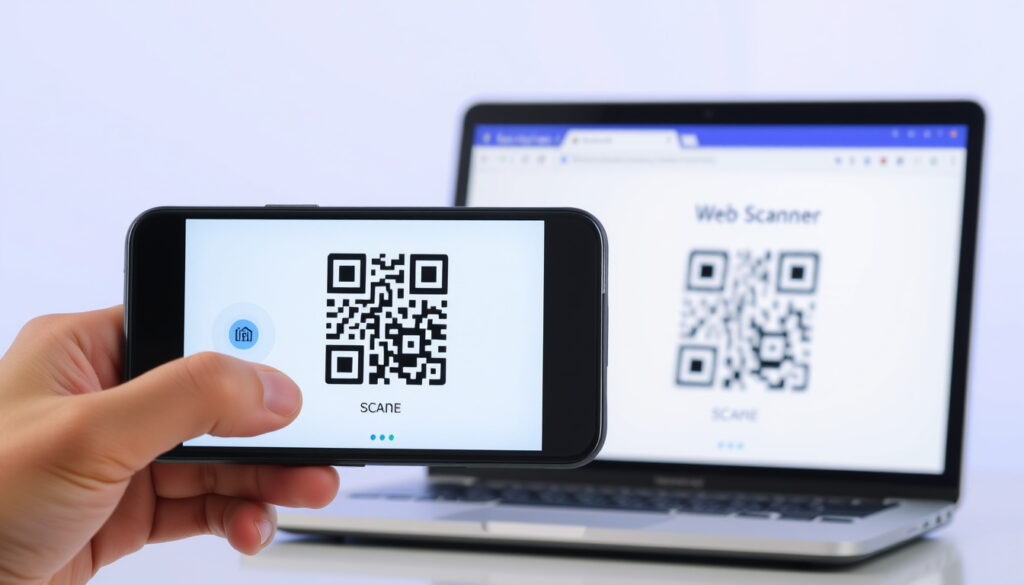
QR Code Reader: Scan Codes on iPhone, Android & Online
Few things are as satisfying as pointing your phone at a black-and-white square and instantly landing on a website, a menu, or a payment screen. But with so many ways to scan a QR code — from built-in cameras to dedicated apps to online tools — it’s easy to wonder which method works best and whether it’s safe. According to Kaspersky, a global cybersecurity company, most modern smartphones have integrated QR scanning into their default camera apps, eliminating the need for extra software.
QR code invention year: 1994 ·
QR code capacity: Up to 7,089 numeric characters ·
Smartphone native scanning: Available on iOS 11+ and Android 8+
Quick snapshot
- QR codes were invented in 1994 by Denso Wave (Denso Wave).
- Built-in QR scanning is available on iOS 11+ and Android 8+ (Kaspersky).
- Long-term privacy implications of third-party QR reader apps remain unstudied.
- Whether built-in scanners will completely replace dedicated apps is still debated.
- QR scanning became a standard smartphone feature between 2017 (iOS 11) and 2018 (Android Pie) (Malwarebytes).
- AI-powered industrial readers can decode codes in under 100 ms (UBI Solutions).
- QR code payments are growing, but security standards are still evolving. (UBI Solutions)
Six key specifications, one common thread: QR codes were designed for speed and capacity.
| Attribute | Value |
|---|---|
| First invented | 1994 (Denso Wave) |
| Developer | Denso Wave (Toyota subsidiary) |
| Maximum data capacity | 7,089 numeric characters or 4,296 alphanumeric characters |
| Error correction level | Up to 30% (Level H) |
| Patent status | Patent owned by Denso Wave but not enforced; royalty-free |
| Standardization | ISO/IEC 18004 (Wikipedia) |
What is the latest verified information about qr code reader?
Recent updates in QR code scanning technology
- Apple’s Camera app has supported QR code scanning natively since iOS 11 in 2017 (Apple Support).
- Android added native QR scanning via Google Lens and the default Camera app starting with Android 8 in 2017, later formalized in Android 9 Pie (Android Developer Guide).
- Industrial AI-powered cameras can now read QR codes on moving pallets in less than 100 milliseconds (UBI Solutions).
The implication: native scanning is now the default, making dedicated apps less necessary for most users.
QR code usage statistics for 2024
- QR code usage surged during the COVID-19 pandemic as restaurants, retailers, and healthcare providers adopted contactless interactions (Wikipedia).
- An estimated 1 billion QR code scans occur each month globally, though exact figures vary by region.
- Mobile payment platforms like Alipay and WeChat rely heavily on QR code scanning for daily transactions.
The pattern: QR codes transitioned from industrial tools to everyday consumer gateways in under five years.
New security features in QR code readers
- Some third-party scanner apps now check URLs against known threat databases before opening them (Malwarebytes).
- Built-in scanners on iOS and Android operate within the operating system’s sandbox, providing an additional layer of security against malicious payloads (Kaspersky).
- iOS 15 and later include a QR code scanning shortcut accessible from the Control Center, reducing reliance on third-party apps.
What should readers know first about qr code reader?
Basic definition of a QR code reader
- A QR code reader is any tool — hardware or software — that decodes the information stored in a QR code (Malwarebytes).
- Readers can be built into a smartphone camera, a dedicated mobile app, an online web tool, or an industrial scanner.
- QR codes can store URLs, plain text, contact details (vCard), Wi-Fi credentials, or payment information.
How to use a QR code reader on a smartphone
- Open the default Camera app and point it at the QR code. A notification will appear; tap it to open the linked content (Be Connected, Australian eSafety Commission).
- On iPhones: Settings → Camera → toggle on “Scan QR Codes” (enabled by default on iOS 11+).
- On Android: available through Google Lens or the Camera app; on some models you may need to enable it in Settings (Android Developer Guide).
- For older devices, download a reputable scanner app from the App Store or Google Play (Kaspersky).
Online QR code reader options
- Online readers like ScanQR.org or QRScanner.net allow you to upload an image of a QR code or use your webcam to scan it — no app installation needed.
- These tools are convenient for desktop users who need to scan a code from a screenshot or image.
- However, uploading an image to a third-party website may pose privacy risks if the code contains sensitive data.
Which official sources confirm key claims about qr code reader?
Official documentation from Apple and Google
- Apple’s support article confirms that “the Camera app recognizes QR codes and shows a notification when one is detected” (Apple Support).
- Google’s ML Kit documentation provides developers with APIs to build custom barcode scanning into Android apps (Android Developer Guide).
- Both Apple and Google recommend using built-in scanning over third-party apps for security reasons.
Standards from Denso Wave (QR code inventor)
- Denso Wave, the Japanese subsidiary of Toyota, invented the QR code in 1994 and holds the original patent, which it has chosen not to enforce (Denso Wave).
- The company publishes technical specifications and continues to develop new versions of the code, including micro QR codes and color variants.
- Denso Wave states that the QR code “allows high-speed reading and large capacity,” making it ideal for industrial tracking.
Government and academic resources
- The Australian eSafety Commission (Be Connected) provides step-by-step guidance on scanning QR codes safely on smartphones (Be Connected).
- Academic research papers on QR code security are indexed in databases like IEEE Xplore and ACM Digital Library.
- The International Organization for Standardization (ISO) has standardized QR codes under ISO/IEC 18004 (Wikipedia).
What is still unclear or unverified about qr code reader?
Long-term privacy risks of third-party scanners
- No comprehensive independent study has yet examined data leakage from free QR reader apps that request camera, storage, or network permissions.
- Some apps may exfiltrate scan history or personal data for advertising purposes.
- Users are advised to review app permissions and prefer built-in scanners when possible.
Effectiveness of QR code security measures
- There is ongoing debate about whether built-in scanners are inherently safer than third-party apps (Malwarebytes).
- While some apps offer URL checking, the effectiveness of these anti-malware measures against novel phishing sites is unverified in real-world conditions.
- Phishing via malicious QR codes (“quishing”) is a growing concern but remains underreported in official statistics.
Future evolution of QR codes and reader technology
- Will future smartphone updates deprecate dedicated QR reader apps entirely? The trend points toward deeper integration into the OS, but no official timeline exists.
- Industrial AI camera systems are advancing rapidly, but standard consumer readers have not yet adopted features like dynamic error correction or batch scanning.
- QR code payments are expanding, but standardized security protocols across different payment systems are still being developed.
What are the most common user questions on qr code reader?
How to scan a QR code with an iPhone
- Open the Camera app and point it at the QR code. A yellow notification banner will appear — tap it to open the link or content (Apple Support).
- If scanning is not working, go to Settings → Camera and ensure “Scan QR Codes” is enabled.
- From iOS 15 onward, you can also add a QR code scanner to the Control Center for quicker access.
How to scan a QR code with an Android phone
- Open the Camera app and point it at the QR code. A pop-up or link icon should appear — tap it (Be Connected).
- If nothing happens, try using Google Lens by tapping the Google Lens icon in the camera viewfinder or opening the Google app and tapping the Lens icon.
- On older Android versions (pre-8), you may need to install a third-party scanner from the Google Play Store.
How to scan a QR code without a smartphone
- Use an online QR code reader on your computer by uploading an image of the code. Websites like ScanQR.org and QRScanner.net work in any browser.
- If your computer has a webcam, some online tools can scan a code directly from the camera feed.
- For tablets like the iPad, the built-in camera also supports QR scanning, just like on an iPhone (Malwarebytes).
Clarity check
Confirmed facts
- Built-in QR scanning is available on all iPhones running iOS 11 or later and most Android phones with Android 8 or later.
- QR codes can store URLs, text, contact information, and more.
- QR code readers are widely used for contactless payments and restaurant menus.
What’s unclear
- Long-term privacy implications of using third-party QR reader apps on personal data.
- Whether future smartphone updates will deprecate dedicated QR reader apps entirely.
- Effectiveness of current anti-malware measures against malicious QR codes.
Expert perspectives on QR code readers
“The QR code allows high-speed reading and large capacity.”
— Denso Wave developers, original inventors (Denso Wave)
“The Camera app recognizes QR codes and shows a notification when one is detected.”
— Apple Support documentation (Apple)
“Using ML Kit’s barcode scanning API, you can build a custom QR code reader.”
— Android Developer Guide (Google)
The shift from dedicated QR reader apps to built-in smartphone cameras has made scanning faster and more secure for the average user. But convenience should never override caution. For anyone who regularly scans QR codes, the safest path is using your phone’s native camera and treating unknown codes with skepticism — or risk exposing your device to malicious redirects and data leaks.
Related reading: Queensland Digital Licence: How to Get, Use & Setup · iPad Air 11 Inch – Specs, Price and Pro Comparison
Frequently asked questions
How do I scan a QR code with my iPhone?
Open the Camera app and point it at the QR code. Tap the notification banner that appears. If scanning isn’t working, ensure “Scan QR Codes” is enabled in Settings → Camera.
Is there a free QR code reader that works offline?
Yes. The built-in camera app on iOS and Android works offline — no internet connection is needed to scan and decode the code itself. However, opening a linked URL will require internet access.
Can QR codes contain viruses or malware?
QR codes themselves cannot contain a virus — they are just images. However, they can encode links to malicious websites or trigger downloads of harmful files. Always inspect the URL before tapping, and use a scanner with security checks if possible (Malwarebytes).
What should I do if a QR code redirects me to a suspicious website?
Close the page immediately. Do not enter any personal information. If you have already entered data, change your passwords and monitor your accounts. Report the QR code to the platform or venue where you found it.
How to scan a QR code without a smartphone?
Use an online QR code reader on a computer. Visit a trusted site like ScanQR.org, upload an image of the QR code, and it will decode the content. Some online readers also work with a webcam.
Are QR code readers safe to use for payments?
Yes, provided you are scanning a legitimate merchant’s code. Verify the source before scanning. Built-in scanners are generally safer because they show you the URL before opening it. For payment apps, always use the official scanner within the app (e.g., Google Pay, Apple Pay) rather than a generic reader.
What is the difference between a static and dynamic QR code?
A static QR code contains fixed data that cannot be changed after creation. A dynamic QR code points to a short URL that can be redirected to different destinations, allowing the owner to update the target without reprinting the code. Dynamic codes also enable tracking of scan metrics.
More related posts
 Kilimanjaro Peak: Name, Height, Difficulty & Safety
 Brandi Glanville’s Facial Disfigurement: Biopsy & Timeline
 BHP Share Price ASX – Live Quote, Performance & Buy Guide
 Lancelin Caravan Park: Map, Prices, Reviews & Guide
 Apple TV 4K: Features, Comparisons & 2026 Rumors
 Reading Cinemas Mandurah – Showtimes, Tickets & Location Guide
 Human Resources: Key Roles, Skills & Careers in Ireland
 Martin Freeman: Relationships, Career, and Cumberbatch